If you want to make online calls or send SMS messages without relying entirely on a traditional mobile service, Globfone is one browser-based option worth knowing about. It provides online calling, SMS messaging, video communication, and peer-to-peer file sharing through its web platform.
It has a free service as well as a paid Premium option. However, the free service is not unlimited. Calling and messaging depend on available free credit, supported destinations, verification requirements, and current service conditions.
This review explains what the platform does, how it works, its main features, benefits, limitations, safety considerations, and how to use its calling and SMS services.
What is Globfone?
Globfone is an online communication platform that provides services such as browser-based phone calls, SMS messaging, video chat, and peer-to-peer file sharing. Its main service is designed to let users access communication tools through a web browser rather than depending entirely on a traditional installed communication application.
The platform offers both free and paid services. Its free services are supported by advertising and come with usage restrictions, while Premium provides additional features and greater access.
Globfone’s current website describes its free service as providing small daily credits for calls and SMS, while Premium provides additional calling options, broader coverage, and an ad-free experience.
What Can You Do With Globfone?
Depending on the service and current availability, users can:
- Make browser-based VoIP calls to supported phone numbers
- Send SMS messages to supported destinations
- Use browser-based video communication
- Transfer files through peer-to-peer technology
- Upgrade to Premium for additional calling features
The important point is that availability is not identical for every country or phone number. Globfone checks supported destinations and applies its own service and usage conditions.
How Globfone Works Through a Web Browser
For browser-based calling, WebRTC technology. This allows compatible browsers to handle audio communication without requiring additional calling plugins.
Users generally need a modern browser, a microphone, speakers or a headset, and a stable internet connection. Browser permission to access the microphone is also necessary for calls.
Does Globfone Require an App?
No traditional app installation is required for its web-based services. Globfone’s current platform is focused on browser access, including mobile browsers.
Its website also states that its older mobile applications have been retired while updated mobile applications are being planned. Therefore, users should not assume that an older mobile app found elsewhere represents the current service.
How Does Globfone Work?
How Globfone’s Online Calling Works
Globfone’s online calling service connects a browser-based webphone with supported mobile or landline numbers through VoIP technology.
The basic process is straightforward:
- Open Globfone in a supported browser.
- Sign in or create an account.
- Complete the required verification.
- Open the phone calling service.
- Select the destination country.
- Enter the recipient’s phone number.
- Allow microphone and audio permissions.
- Start the call if you have sufficient free balance.
The Role of WebRTC
WebRTC is a browser technology used for real-time communication. In Globfone’s case, it allows the web browser to handle the audio side of a call.
This is useful because users do not need to install a separate browser plugin simply to access the webphone. However, browser compatibility and permissions still matter.
Browser and Microphone Requirements
A compatible and updated browser is important. Globfone lists modern browsers such as Chrome, Firefox, Edge, and Safari among the browsers that support its calling requirements.
You also need a working microphone and speakers or a headset. If microphone permission is blocked, the browser-based phone service cannot properly access the audio device.
Why a Stable Internet Connection Matters
Because the service operates through the internet, connection quality can affect the calling experience. A weak or unstable connection can contribute to poor audio or connection problems. Globfone itself recommends a stable internet connection for its browser calling service.
Globfone Features
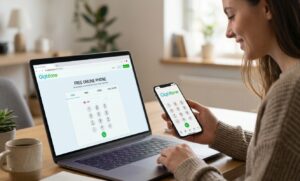
Free Online Phone Calls
One of Globfone’s main features is browser-based calling to supported phone numbers. The service can connect users to supported mobile and landline destinations.
However, free calling should not be confused with unlimited calling. Globfone’s free service uses limited credits, and the amount of calling time can vary depending on the destination and current conditions.
Online SMS Messaging
Globfone also provides an online SMS service. Users select a supported destination country, enter the recipient’s number, write their message, and submit it through the service.
The current SMS system checks factors such as destination support and available free balance before sending. Delivery can vary depending on the destination, operator, provider, and technical conditions.
Video Chat
Video communication is another feature offered through the Globfone platform. Unlike phone calls to regular mobile or landline numbers, browser-based video communication is intended for users communicating through the web environment.
Globfone’s service-status page currently lists its video chat service as operating without reported issues at the time of that status update.
Peer-to-Peer File Sharing
Globfone also provides peer-to-peer file sharing. Its terms describe video calls and file transfers as using peer-to-peer technology between users.
This is different from sending a file through a conventional cloud-storage service because the communication is designed around a direct browser-to-browser connection.
Mobile Browser Support
It can be accessed from a mobile browser, so users can use its web services without depending on an installed mobile application.
However, the experience can vary according to the phone, browser version, permissions, and internet connection.
Globfone Premium Services
Globfone Premium is the paid version of the service. Its current Premium page describes it as a prepaid, pay-as-you-go service with features such as no advertising, higher-quality calling routes, broader country coverage, and additional SMS operators.
The Premium page currently lists plans starting from EUR 5.00, although pricing and available features can change.
How to Use Globfone for Online Calls
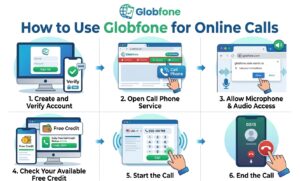
Step 1: Create and Verify a Globfone Account
It currently requires registration and verification for its free calling and SMS services. Its current FAQ states that verification can involve email confirmation, phone-number verification, and payment-card verification for identity and fraud-prevention purposes.
Step 2: Open the Call Phone Service
After completing the required account process, open Globfone’s phone calling service. Choose the country you want to call and enter the recipient’s phone number according to the instructions provided on the page.
Step 3: Allow Microphone and Audio Access
Your browser may ask for permission to access your microphone. Allow the required permission and make sure your speakers or headset are working. Without microphone access, the browser-based calling system cannot properly establish the audio connection.
Step 4: Check Your Available Free Credit
Free calls use the available free balance. The amount of calling time you receive is not necessarily the same for every destination. Some destinations may consume credit more quickly than others, so you should check the available balance before starting a call.
Step 5: Start the Call
Once the number and permissions are ready, start the call. If the destination is currently supported and you have sufficient balance, Globfone can attempt to connect the call.
Step 6: End the Call
When the conversation is finished, end the call through the browser interface. Free calling time is affected by the available balance and current service conditions.
How to Send an SMS With Globfone
Open the Send Text Service
Go to Globfone’s SMS service and select the destination country. The current interface shows only countries and operators supported by its free SMS service at that time.
Enter the Recipient’s Number
After choosing the country, enter the recipient’s phone number according to Globfone’s instructions. The country code is handled through the selected destination.
Double-check the number before sending because an incorrect number can prevent the message from reaching the intended recipient.
Write Your Message
Enter your SMS message in the available text field. Pay attention to the character count, particularly when using languages or characters that may require different SMS encoding.
Long messages can sometimes be divided into multiple SMS segments depending on the message and network conditions.
Check Available Free Usage
Before sending, Globfone can check the available free balance and destination eligibility. Free SMS is supported by advertising, so it is not an unlimited messaging service.
Send the SMS
After completing the required checks, submit the message. Remember that successful submission does not guarantee instant delivery. SMS delivery can depend on external providers, mobile operators, routing, and destination conditions.
Is Globfone Free?
It provides free access to selected communication services, including calling and SMS, subject to its current requirements and limits.
The free service is funded partly through advertising. This means users may see advertisements while using the service.
How Free Calling Credits Work
Free calling is based on limited credits rather than unlimited usage. Globfone describes these as small free boosts or balances.
The amount of calling time available can vary significantly depending on the destination. Therefore, it is not accurate to promise every user a specific number of free minutes.
Why Free Calls Have Usage Limits
Usage restrictions help control abuse and the cost of providing phone connectivity. Globfone states that its free service has limits intended to keep the service available and prevent misuse.
What Is Globfone Premium?
Premium is the paid option for users who need more consistent access and additional features. It currently advertises Premium with no ads, pay-as-you-go pricing, higher-quality routes, expanding country coverage, and additional SMS operators.
Free Globfone vs. Premium Globfone
The free version is more appropriate for occasional use where limited credits are enough. Premium is designed for users who need more calling access and fewer restrictions. The choice depends on how frequently you use the service and whether the free limits meet your needs.
Benefits of Globfone
Browser-Based Communication
One of Globfone’s biggest advantages is browser access. Users can access its services without relying on a separate desktop calling application.
No Plugin Required for Web Calling
The webphone uses WebRTC, so additional calling plugins are not required. This makes the initial setup relatively simple on a compatible browser.
Calling and SMS in One Platform
Globfone combines several communication tools in one service. Users can access calling and SMS along with video communication and file sharing.
International Communication Options
It supports international communication, but the exact destinations available can change. Users should check the current destination list instead of assuming every country or operator is supported.
Free Option for Occasional Use
The free tier can be useful when you only need a short call or occasional SMS and the destination is supported.
Limitations of Globfone
Free Usage Has Limits
The biggest limitation is that free usage is not unlimited. Free credits can be small, and the amount of calling time depends on the destination and current conditions.
Service Availability Can Change
Globfone’s service status shows that calling availability can change because of issues involving upstream providers. Its status page has previously reported temporary call restrictions in certain countries.
SMS Delivery Can Vary
SMS delivery is affected by external providers and mobile operators. A message being submitted successfully does not always mean the recipient will receive it immediately.
Internet Access Is Required
Browser calling requires an internet connection. If your connection is unstable, the calling experience may be affected.
Browser Permissions Are Necessary
Microphone permissions are required for browser calling. Firewall settings, browser restrictions, ad blockers, or other local settings can also interfere with the service.
Free Service Is Ad-Supported
Free calling and SMS services are supported by advertising. Users who prefer an ad-free experience may consider Premium.
Is Globfone Safe and Legit?
It is an established online communication service operated by i-Trends Sp. z o.o., according to its current Terms of Use.
However, “legitimate” does not mean that every call or SMS will always work successfully. The company itself states that its services depend on external technologies and providers and does not guarantee uninterrupted availability.
It also publishes a privacy policy explaining the types of information it processes. For example, its policy states that account information, call metadata, technical information, and SMS-related information may be processed. It also says that recipient numbers and full SMS content are sent to an external SMS gateway when an SMS is delivered.
Globfone Pros and Cons
| Pros | Cons |
| Browser-based communication | Free usage has limits |
| Free calling and SMS options | Verification is required for current free services |
| WebRTC calling without additional plugins | Availability varies by destination |
| Video communication | SMS delivery can vary |
| Peer-to-peer file sharing | Internet access is required |
| Mobile-browser access | Browser permissions are necessary for calls |
| Premium option available | Free services are advertising-supported |
| International calling and messaging options | Service availability can change |
Globfone vs. Other Communication Options
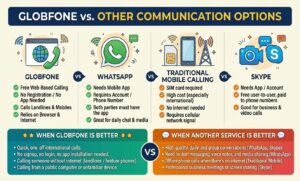
Globfone vs. WhatsApp
Globfone and WhatsApp serve somewhat different purposes. It can connect browser users with supported phone numbers through its VoIP calling service. WhatsApp is primarily designed for communication between WhatsApp users.
Therefore, Globfone can be useful when you specifically need browser-based access to a supported phone number, while WhatsApp may be more convenient when both people already use the same messaging platform.
Globfone vs. Traditional Mobile Calling
Traditional mobile calling uses a mobile carrier’s network and does not require a browser-based VoIP service.
Globfone, by comparison, relies on internet connectivity, browser technology, and its own service providers. This makes Globfone useful in some situations but also means its availability depends on internet and service conditions.
Globfone vs. Skype
Skype should not be treated as a current direct alternative because Microsoft retired Skype on May 5, 2025. Microsoft has directed users toward Teams Free as its current consumer communication alternative. Therefore, older articles comparing Globfone with active Skype services are now outdated.
When Globfone May Be a Better Choice
Globfone may make sense when you want:
- Browser-based calling
- Occasional free international communication
- Online SMS access
- Multiple communication features in one web platform
- A service that does not require a separate calling plugin
When Another Service May Be Better
Another communication service may be more suitable if you need a platform with a different calling model, consistent availability for a particular destination, or features that Globfone’s free tier does not provide.
Who Should Use Globfone?
Globfone can be useful for people who occasionally need browser-based communication.
It may be suitable for:
- Users who want to try online calling
- People who need occasional international calls
- Users who want to send an online SMS
- People who prefer browser-based services
- Users who do not want to install a traditional desktop calling program
- People who want to test a free service before paying for Premium
However, users with frequent communication needs should carefully consider the free limits and destination availability.
Read Also: Front Balcony Design India: Simple Ideas to Make Your Home Look Beautiful
Tips for Using Globfone
Use a Modern Supported Browser
Keep your browser updated. Globfone’s webphone depends on modern browser technology such as WebRTC.
Check Current Service Availability
Before making an important call, check whether your destination is currently supported. Availability can change.
Keep Your Internet Connection Stable
A stable connection is important for browser-based voice communication.
Allow Required Browser Permissions
If Globfone cannot access your microphone, check the browser’s site permissions and make sure the correct microphone and audio devices are selected.
Check Your Free Balance
Do not assume that every free call will last the same amount of time. Check your available credit before calling.
Do Not Depend on Free Calling for Critical Communication
Because Globfone’s free service has limits and availability can change, it is better to have another communication method available when a call is urgent or especially important.
Final Verdict
Globfone is worth considering if you need occasional browser-based calls or SMS and your destination is supported. Its main advantages are browser access, free options, WebRTC calling, international communication, and additional services such as video chat and peer-to-peer file sharing.
However, it is important to understand what the free service actually provides. It is not an unlimited free calling service. Free credits are limited, verification is required, SMS delivery can vary, and service availability may change by country or operator.
Overall, it is a legitimate browser-based communication platform with useful free features, but users should have realistic expectations about its limits, availability, and privacy requirements.
FAQs About Globfone
What is Globfone used for?
It is used for browser-based phone calls, SMS messaging, video communication, and peer-to-peer file sharing.
Is Globfone really free?
Yes, it offers free services, but the free tier has usage limits and is supported by advertising. Free calling and SMS also require the current verification process.
Does Globfone require registration?
Yes. According to Globfone’s current FAQ, registration and verification are required for its free calls, SMS, and other free services.
Can I make international calls with Globfone?
Yes, it provides international calling to supported destinations. However, coverage and availability can vary, so users should check the current service before calling.
Can I send free SMS through Globfone?
Yes. it provides a free SMS service to supported destinations, subject to balance, verification, operator, and service restrictions.
Does it work on mobile phones?
Yes. Globfone can be accessed through a mobile browser. The current platform is designed to remain available through its mobile-friendly website.
Do I need to download an app?
No, you do not need an app to use the browser-based services. Globfone’s current platform is focused on web access, while its older mobile applications have been retired.
Pingback: Dmi Finance Login: A Complete Guide to Accessing Your Account
Pingback: Globex HRMS Software Review: Everything You Need to Know